Friday, October 10, 2014
ant build failed cannot find build.xml
I formatted my computer and moved stuff around.
So now I tried to get back working on Phonegap but I started having issues with the code not compiling.
here are the steps I had to do get back on track.
1. install jdk and jrk
2. download android sdk
3. download ant
4. download/install cygwin
5. install cordova using npm
6. setup your JAVA_HOME, ANDROID_HOME, and ANT_HOME in your environment
7. edit the file local.properties to point to the location of your android sdk (in my case sdk.dir=C:\\android-sdk\\sdk)
**
NOTES:
1. open cmd terminal, and type ant. If you get build failed then ANT is installed properly
2. if you get (ant build failed cannot find build.xml) then go back to 7 and make sure the link is correct

Monday, April 28, 2014
Simple Phonegap index.html file to show contacts' images, names and phone numbers
This is a simple Phonegap index.html file to show contacts' images, names and phone numbers
 <!DOCTYPE html>
 <html>
   <head>
     <meta charset="utf-8" />
     <meta name="format-detection" content="telephone=no" />
     <meta name="viewport" content="user-scalable=no, initial-scale=1, maximum-scale=1, minimum-scale=1, width=device-width, height=device-height, target-densitydpi=device-dpi" />
     <link rel="stylesheet" type="text/css" href="css/index.css" />
     <title>Hello World</title>
           <style>
           .app {
                background:none !important;
                position: relative !important;
                left: 1% !important;
                top: 1% !important;
                height: auto !important;
                width: auto !important;
                text-align: center !important;
                padding:0 !important;
                margin:0 !important;
           }
           img.contact{background: url('img/user-default.png') no-repeat scroll 0 0 transparent; backgorund-size:45px 45px; height:auto!important; width:auto!important; }
 </style>
   </head>
   <body>
     <div class="app">
       <h1>PhoneGap.. ..</h1>
                <div id="contacts"><div>
     </div>
     <script type="text/javascript" src="phonegap.js"></script>
     <script type="text/javascript">
      // Wait for device API libraries to load
     //
     document.addEventListener("deviceready", onDeviceReady, false);
     // device APIs are available
     //
     function onDeviceReady() {
       // find all contacts
       var options = new ContactFindOptions();
                options.filter = "";     // empty search string returns all contacts
                options.multiple = true;   // return multiple results
       var filter = ["displayName", "name", "phoneNumbers", "photos"];
       navigator.contacts.find(filter, onSuccess, onError, options);
     }
     // onSuccess: Get a snapshot of the current contacts
     //
     function onSuccess(contacts) {
                document.getElementById("contacts").innerHTML += "CONTACTS (" + contacts.length + ")<br/>";
       // display the address information for all contacts
       for (var i = 0; i < contacts.length; i++) {
         if(contacts[i].phoneNumbers != null && contacts[i].phoneNumbers.length > 0 && contacts[i].phoneNumbers[0].value != null && contacts[i].phoneNumbers[0].value != undefined ) {
                          for (var j = 0; j < contacts[i].phoneNumbers.length; j++) {
                               if(contacts[i].photos[j] != null && contacts[i].photos[j] != undefined){
                               var phone = contacts[i].phoneNumbers[j].value;
                               var displayName = contacts[i].displayName;
                               var name = contacts[i].name;
                               var z = imageHandle(phone, name, displayName, contacts[i].photos[0].value);
                               function imageHandle(phone, name, displayName, img){
                                    window.resolveLocalFileSystemURI(img, function(fileEntry){
                                         document.getElementById("contacts").innerHTML += "<img class='contact' src='" + img + "'/> " + name.formatted + " (" + displayName + ") " + phone + "<br/>";
                                    }, function(e){
                                         document.getElementById("contacts").innerHTML += "<img class='contact' src='img/user-default.png'/> " + name.formatted + " (" + displayName + ") " + phone + "<br/>";
                                    });
                               }
                               }
                          }
                     }
                }
     };
     // onError: Failed to get the contacts
     //
     function onError(contactError) {
       alert('onError!');
     }
     </script>
   </body>
 </html>
Solution to "Invalid Bundle Structure - The binary file ... is not permitted. Your app may contain only one executable file" for apps built by Phonegap
Posting to Apple as we all know is a pain in the ass.
For the last few days I've been trying to debug my app to submit it to Apple. I use Application Loader to upload the app and the biggest hurdle I ran into was the error:
Invalid Bundle Structure - The binary file 'xx.app/xx' is not permitted. Your app may contain only one executable file. Refer to the Bundle Programming Guide for information on the iOS app bundle structure.
After hours of pulling hair here is how I solved it:
For the last few days I've been trying to debug my app to submit it to Apple. I use Application Loader to upload the app and the biggest hurdle I ran into was the error:
Invalid Bundle Structure - The binary file 'xx.app/xx' is not permitted. Your app may contain only one executable file. Refer to the Bundle Programming Guide for information on the iOS app bundle structure.
After hours of pulling hair here is how I solved it:
- After compiling your app with Phonegap remove:
- platforms > ios > build > simulator
- platforms > ios > build > device
- Open platforms > ios > projectName.xcodeproj
- Go to Product in xcode then Scheme > Edit Scheme > executable = projectName.app
- Go to Product in xcode then Scheme > Edit Scheme > Build Configuration = Release
- Replace with your app icons all icons under platforms > ios > projectName > Resources > icons
- Replace with your app splash screen images all images under platforms > ios > projectName > Resources > splash
- Add all images from splash and icons folders in config.xml file
- Zip your directory, upload to Phonegap, download IPA from Phonegap, Upload with Application Loader
That's all. I hope this help someone.
Wednesday, February 19, 2014
Step by step on how to add Facebook plugin on Phonegap
I have posted an answer on stackoverflow on how to do it and here is more:
Using CLI add the APP_ID and APP_NAME variables to your command. Something like this:
C:\myProject>cordova plugin add https://github.com/phonegap/phonegap-facebook-plugin --variable APP_ID=your_facebook_app_id --variable APP_NAME=your_facebook_app_name
I got it installed this way but not sure if the app is functional or not. Something to test.
I had an issue with phonegap build giving me the error One of your plugins requires a parameter: APP_ID, APP_NAME. That was because I didn't add those variables to the config.xml file.
This solved it
Please remember to modify the plugin.xml file under root/plugins/com.phonegap.plugins.facebookconnect/plugin.xml
Also, I had issue with facebook failing to initial and it was because my config.xml had this
and solved it by changing it to this:
This should get the app to work.
After you start using it you will notice when you do login facebook will through at you errors like "invalid android_key parameter". This means that you haven't register the app platform on Facebook.
Go to your app facebook page: https://developers.facebook.com/x/apps/app_id/settings/
Under Settings -> Basic -> click on add platform
Now you need to sign your app using command line on windows, for this to work you will need to have java keytool installed and i'm not going through that here, PLEASE KEEP IN MIND TO AVOID ADDING SPACES, SPECIAL CHARACTERS AND ALL LOWER CASE [I had issues with phonegap not recognizing my alias because of that].
C:\mykeystorebox>keytool -genkey -v -keystore mynewkey.keystore -alias mykeyalias -keyalg rsa -keysize 2048 -validity 10000
Enter keystore password:
Re-enter new password:
What is your first and last name?
[Unknown]: sean
What is the name of your organizational unit?
[Unknown]:
What is the name of your organization?
[Unknown]: testcompany
What is the name of your City or Locality?
[Unknown]: london
What is the name of your State or Province?
[Unknown]: on
What is the two-letter country code for this unit?
[Unknown]: ca
Is CN=sean, OU=Unknown, O=testcompany, L=london, ST=on, C=ca correct?
[no]: yes
Generating 2,048 bit RSA key pair and self-signed certificate (SHA256withRSA) with a validity of 10,000 days
for: CN=sean, OU=Unknown, O=testcompany, L=london, ST=on, C=ca
Enter key password for
(RETURN if same as keystore password):
[Storing mynewkey.keystore]
C:\mykeystorebox>keytool -exportcert -alias mykeyalias -keystore mynewkey.keystore | openssl sha1 -binary | openssl base64
Enter keystore password: *************
Abikekw4k3lfmK23kvJl32Ljflw301=
Now go back to facebook page and take Abikekw4k3lfmK23kvJl32Ljflw301= and put it under Key Hashes. You will need to add your app class in there too.
Save that.
Now go to Phonegap and upload your keystore as a key for your android and sign your APK with it. It will ask for a title and could be anything, alias and in this case should be mykeyalias.
Using CLI add the APP_ID and APP_NAME variables to your command. Something like this:
C:\myProject>cordova plugin add https://github.com/phonegap/phonegap-facebook-plugin --variable APP_ID=your_facebook_app_id --variable APP_NAME=your_facebook_app_name
I got it installed this way but not sure if the app is functional or not. Something to test.
I had an issue with phonegap build giving me the error One of your plugins requires a parameter: APP_ID, APP_NAME. That was because I didn't add those variables to the config.xml file.
This solved it
<gap:plugin name="com.phonegap.plugins.facebookconnect">
  <param name="APP_ID" value="your_facebook_app_id" />
  <param name="APP_NAME" value="your_facebook_app_name" />
</gap:plugin>
Please remember to modify the plugin.xml file under root/plugins/com.phonegap.plugins.facebookconnect/plugin.xml
<preference name="APP_ID" />
<preference name="APP_NAME" />
Also, I had issue with facebook failing to initial and it was because my config.xml had this
<widget id="com.app.xxx" version="0.0.1" xmlns="http://www.w3.org/ns/widgets" xmlns:gap="http://cordova.apache.org/ns/1.0">
and solved it by changing it to this:
<widget id="com.app.xxx" version="1.0.0" xmlns="http://www.w3.org/ns/widgets" xmlns:gap="http://phonegap.com/ns/1.0">
This should get the app to work.
After you start using it you will notice when you do login facebook will through at you errors like "invalid android_key parameter". This means that you haven't register the app platform on Facebook.
Go to your app facebook page: https://developers.facebook.com/x/apps/app_id/settings/
Under Settings -> Basic -> click on add platform
Now you need to sign your app using command line on windows, for this to work you will need to have java keytool installed and i'm not going through that here, PLEASE KEEP IN MIND TO AVOID ADDING SPACES, SPECIAL CHARACTERS AND ALL LOWER CASE [I had issues with phonegap not recognizing my alias because of that].
C:\mykeystorebox>keytool -genkey -v -keystore mynewkey.keystore -alias mykeyalias -keyalg rsa -keysize 2048 -validity 10000
Enter keystore password:
Re-enter new password:
What is your first and last name?
[Unknown]: sean
What is the name of your organizational unit?
[Unknown]:
What is the name of your organization?
[Unknown]: testcompany
What is the name of your City or Locality?
[Unknown]: london
What is the name of your State or Province?
[Unknown]: on
What is the two-letter country code for this unit?
[Unknown]: ca
Is CN=sean, OU=Unknown, O=testcompany, L=london, ST=on, C=ca correct?
[no]: yes
Generating 2,048 bit RSA key pair and self-signed certificate (SHA256withRSA) with a validity of 10,000 days
for: CN=sean, OU=Unknown, O=testcompany, L=london, ST=on, C=ca
Enter key password for
(RETURN if same as keystore password):
[Storing mynewkey.keystore]
C:\mykeystorebox>keytool -exportcert -alias mykeyalias -keystore mynewkey.keystore | openssl sha1 -binary | openssl base64
Enter keystore password: *************
Abikekw4k3lfmK23kvJl32Ljflw301=
Now go back to facebook page and take Abikekw4k3lfmK23kvJl32Ljflw301= and put it under Key Hashes. You will need to add your app class in there too.
Save that.
Now go to Phonegap and upload your keystore as a key for your android and sign your APK with it. It will ask for a title and could be anything, alias and in this case should be mykeyalias.
Sunday, January 19, 2014
Push Notification Android - Phonegap 3.2 Plugin
I have been trying to test the native phonegap push notification on version 3.2 but almost everything I tried resulted in "Class not found" issue". After a couple of days of trials here is how I finally got it to work.
So what's next?! When you run your app and registration is success what you need to play with is e.regid under the case: "registered".
So what you could do is using ajax send the e.regid to a php file to store that regid in the database as an identity to this user's device.
Next you could test sending the user messages using something like:
- Using the CLI install the push notification plugin:
$ phonegap local plugin add https://github.com/phonegap-build/PushPlugin
- Add
to the header of your index.html<script type="text/javascript" src="PushNotification.js"></script> - Add the following to your index.html body
<div id="home" style="position:absolute; bottom:0; left:0; z-index:99999;"> <div id="app-status-div"> <ul id="app-status-ul"> <li>Cordova PushNotification Plugin Demo</li> </ul> </div> </div> - In your javascript add
var pushNotification; function onDeviceReady() { $("#app-status-ul").append('<li>deviceready event received</li>'); document.addEventListener("backbutton", function(e) { $("#app-status-ul").append('<li>backbutton event received</li>'); if( $("#home").length > 0) { // call this to get a new token each time. don't call it to reuse existing token. //pushNotification.unregister(successHandler, errorHandler); e.preventDefault(); navigator.app.exitApp(); } else { navigator.app.backHistory(); } }, false); try { pushNotification = window.plugins.pushNotification; if (device.platform == 'android' || device.platform == 'Android') { $("#app-status-ul").append('<li>registering android</li>'); pushNotification.register(successHandler, errorHandler, {"senderID":"661780372179","ecb":"onNotificationGCM"}); // required! } else { $("#app-status-ul").append('<li>registering iOS</li>'); pushNotification.register(tokenHandler, errorHandler, {"badge":"true","sound":"true","alert":"true","ecb":"onNotificationAPN"}); // required! } } catch(err) { txt="There was an error on this page.\n\n"; txt+="Error description: " + err.message + "\n\n"; alert(txt); } } // handle APNS notifications for iOS function onNotificationAPN(e) { if (e.alert) { $("#app-status-ul").append('<li>push-notification: ' + e.alert + '</li>'); navigator.notification.alert(e.alert); } if (e.sound) { var snd = new Media(e.sound); snd.play(); } if (e.badge) { pushNotification.setApplicationIconBadgeNumber(successHandler, e.badge); } } // handle GCM notifications for Android function onNotificationGCM(e) { $("#app-status-ul").append('<li>EVENT -> RECEIVED:' + e.event + '</li>'); switch( e.event ) { case 'registered': if ( e.regid.length > 0 ) { $("#app-status-ul").append('<li>REGISTERED -> REGID:' + e.regid + "</li>"); // Your GCM push server needs to know the regID before it can push to this device // here is where you might want to send it the regID for later use. console.log("regID = " + e.regid); } break; case 'message': // if this flag is set, this notification happened while we were in the foreground. // you might want to play a sound to get the user's attention, throw up a dialog, etc. if (e.foreground) { $("#app-status-ul").append('<li>--INLINE NOTIFICATION--' + '</li>'); // if the notification contains a soundname, play it. var my_media = new Media("/android_asset/www/"+e.soundname); my_media.play(); } else { // otherwise we were launched because the user touched a notification in the notification tray. if (e.coldstart) $("#app-status-ul").append('<li>--COLDSTART NOTIFICATION--' + '</li>'); else $("#app-status-ul").append('<li>--BACKGROUND NOTIFICATION--' + '</li>'); } $("#app-status-ul").append('<li>MESSAGE -> MSG: ' + e.payload.message + '</li>'); $("#app-status-ul").append('<li>MESSAGE -> MSGCNT: ' + e.payload.msgcnt + '</li>'); break; case 'error': $("#app-status-ul").append('<li>ERROR -> MSG:' + e.msg + '</li>'); break; default: $("#app-status-ul").append('<li>EVENT -> Unknown, an event was received and we do not know what it is</li>'); break; } } function tokenHandler (result) { $("#app-status-ul").append('<li>token: '+ result +'</li>'); // Your iOS push server needs to know the token before it can push to this device // here is where you might want to send it the token for later use. } function successHandler (result) { $("#app-status-ul").append('<li>success:'+ result +'</li>'); } function errorHandler (error) { $("#app-status-ul").append('<li>error:'+ error +'</li>'); } document.addEventListener('deviceready', onDeviceReady, true); - Now go to your www/config.xml and add
<gap:plugin name="com.phonegap.plugins.PushPlugin" />
So what's next?! When you run your app and registration is success what you need to play with is e.regid under the case: "registered".
So what you could do is using ajax send the e.regid to a php file to store that regid in the database as an identity to this user's device.
Next you could test sending the user messages using something like:
 function send_gcm_notify($reg_id, $message) {
      $apiKey = "AIzaSyDXlsn2rlbTxZsa3apYfQu0kaSNzzzzzag8"; //google browser api key
      $url = 'https://android.googleapis.com/gcm/send';
   $fields = array(
     'registration_ids' =>; array( $reg_id ),
     'data'       =>; array( "message" => $message ),
   );
   $headers = array(
     'Authorization: key=' . $apiKey,
     'Content-Type: application/json'
   );
   $ch = curl_init();
   curl_setopt($ch, CURLOPT_URL, $url);
   curl_setopt($ch, CURLOPT_POST, true);
   curl_setopt($ch, CURLOPT_HTTPHEADER, $headers);
   curl_setopt($ch, CURLOPT_RETURNTRANSFER, true);
   curl_setopt($ch, CURLOPT_SSL_VERIFYPEER, false);
   curl_setopt($ch, CURLOPT_POSTFIELDS, json_encode($fields));
   $result = curl_exec($ch);
   if ($result === FALSE) {
     die('Problem occurred: ' . curl_error($ch));
   }
   curl_close($ch);
   echo $result;
  }
 $reg_id = "APA91bxxxsszzjVXv9jW4O2mD0Nvljf_0BLzjHzCqKa-9VthTYYDqB9BfKj88Fd3234fscARTRaNsm3xKk73V-xWZIM3ETuptUFxxYVwik1234WmeABgcf_yG4Gkd0GSk3Zfydw8Cv6H3b0K";
 $msg = "Google Cloud Messaging working well";
 send_gcm_notify($reg_id, $msg);
Wednesday, January 15, 2014
Push Notification - Phonegap 3.0+ with pushwoosh
I had so much trouble integrating Push Notification using all the documentation available.
After two days of struggle I got to the bottom of it and finally it's working.
Here's what I did.
- If you installed Push plugin before, then delete it and start fresh.
- Follow the instructions in here integrating phonegap on android
- In your config.xml file add < gap:plugin name="com.pushwoosh.plugins.pushwoosh" version="3.0.1" > < /gap:plugin > ....... PLEASE NOTE THE SPACES I ADDED BEFORE AND AFTER THE TAGS IN HERE. REMOVE THE EXTRA SPACING
- projectid: is actually the Project Number under your Developers Console > overview. That's it.
Friday, May 13, 2011
Saturday, March 12, 2011
Passing parameters from HTML to swf(Flash Builder) AS3
I spent countless hours to get this done. Pulled my hair broke my glasses and kicked out my cat all because of lack of finding the right directions on how to get it done.
Find the line
THAT'S IT :D
simple as this:
your flex file is ready! OK
private var in1:String;
private function initHandler():void {
 var obj:Object = this.parameters;
 in1= obj.name;
 Alert.show("OK " + in1);
}
There goes the flex fileNow, when you publish your project using the project>Export Release Build... you need to edit the exported html file (it should be under the same name as your project). So go and edit it
Find the line
 //within the 3rd [script] and after (REPLACE [ WITH < )
 var xiSwfUrlStr = "playerProductInstall.swf";
 //add this line
 flashvars.in1= "WELCOME";  // don't forget ;
 var ver= {};
 var params = {};

 //then you will have [nonscript][object]
 //add


 //then another[object]
 //add
THAT'S IT :D
Thursday, January 13, 2011
FAQ
I will be listing answers for some emails i received in here
Q:
Dear Khalid,
Thank you for the last update, I really like the zoom capability and I also appreciate the ability to move the app to the memory card, but I notices couple of issues:
1. Although I have the whole Quran downloaded on my memory card, every time I open the app it starts downloading!2. The fast bookmarks in the previous version, it used, when click on it to read it, it clears awaiting the new bookmark, but right now it does not clear and bookmarks keeps piling although you don't need them any more and I looked for a way to clear them but I did not find, am I missing it? if there is a way could you please let me know?
Thanks, and JAK!
Abdelhamid
A:
I am so glad you like this new update. For some reason i receive some issues with this version! In your case I have no idea why it keeps downloading everytime you open the app. My suggestion is to delete more than 100 pages by going to FIX in the main menu. That way, the app will delete all pages and start downloading a fresh copy of all pages which by the way I updated so that could be the reason. Also, about the bookmarks, it should keep your bookmarks, and yes they'll pile up. However, if you decided to delete any bookmark just long press on the one you wish to delete and it should be gone immediately.
I really hope this helps
Walsalmo Alikum,
Sunday, January 9, 2011
Donations
 | |  |  |  |  |
مصحف المدينة المنورة | ترجمة المصحف الإنجليزية | مصحف الشمرلي | ترجمة المصحف الفرنسية | ترجمة المصحف الألمانية | ترجمة المصحف الصينية |
لدعمكم وتبرعكم لبرامج القرآن الكريم على الاندرويد الرجاء الضغط على هذا الزر

Quran - Urdu
Quran - Urdu
Please notice that this version is adapted from Madina version; therefore, you will notice some pages written in Arabic.
Quran - Urdu v4.4:
Thursday, December 30, 2010
The Holy Quran V.4
This is the new update v.4 for "The Holy Quran." I tried my best to solve the missing page(s) issue after finishing download. And many other issues that many people stressed on such move2sd, portrait and landscape viewing, and bookmarking errors.
The code has been optimized for faster browsing and less unexpected shutdown.
Hope you'll like it :D
The code has been optimized for faster browsing and less unexpected shutdown.
Hope you'll like it :D
Medina's update v4.0 :
Saturday, December 18, 2010
New Update for The Holy Quran
I am working on updating The Holy Quran (all versions) to allow move2sd. However PLEASE NOTIFY that this update will work only on android 2.2. So if you have android 2.1 you don't delete your copy assuming this will work on yours.
Release date ... soon :D
Release date ... soon :D
Wednesday, December 1, 2010
Dell XPS L501X
The box

after unboxing: manual and warranty, charger, drivers and utilities dvd and the laptop

accessories

Front

sensitive function buttons and indicators

Left corner showing USB3 and vent.
notice with 9-cell battery you get this space underneath (awesome for ventilation)

AC adapter with blue led

back

right corner

right corner

I will post a video for the unboxing and some others for comparison
Sunday, November 7, 2010
Dell XPS L501X
The new edition of Dell XPS is out now with so many amazing features added to this line. This line with configuration such as:


HDMI 1.4, USB 3, HD webcam, i7 processor, NVIDIA GT435M GeForce with 3DTV Play, JBL 2.1 Speakers which includes a 20W sub woofer, and the ultra-clear 1080p resolution are so tempting for a user thinking of investing in a laptop. Personally, I think a laptop with all those features must last you at least 3 years without the need to any hardware upgrade.
On the other hand, some people will consider the bulky design and the lack for a VGA input a disadvantage. Other than that, the Dell XPS L501X beats it's competitor in the multimedia line for a price starting from $800.
(UPDATE): Finally I made my mind and decided and purchasing one myself. So once I get it I will post some photos and maybe a video :D stay tuned
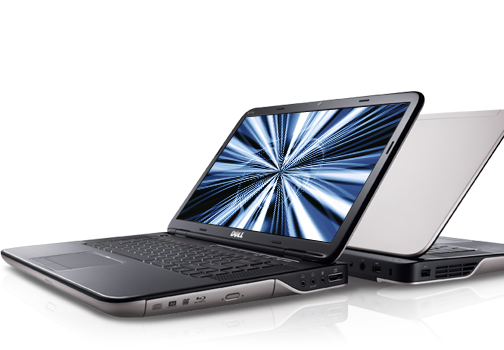

And this is cnet report about it which frankly is the only report out there so far.
Thursday, September 2, 2010
The Holy Quran - German version for android

This thread is going to focus on the German version of The Holy Quran app made for android. Any update will be posted here and I will mention the update date.
Same issue with other languages support. If you have any comment, suggestion, or think I made a mistake in the layout translation please let me know.
This is a link to those who don't have market on their devices
The Holy Quran - Chinese version for android

Here is a link to those of you who don't have a market on their phones.
Wednesday, September 1, 2010
The Holy Quran - French version for android
soon, The Holy Quran - German version for android, and The Holy Quran - Chinese version for android

BTW, I really tried my best to make the UI look French and I will add more rather than using English or Arabic in it IF I found someone to help me with that
Updated Sep 02, 2010
here is the link:
Saturday, August 14, 2010
Missing Pages or Mixed Order
For those of you experiencing issues wither either the order of the Holy Quraan pages or missing pages. Here is a quick solution for you.
**THIS WILL APPLY IF YOU WERE USING A VERSION OLDER THAN 3.4**
On version 3.4 you could simply click on FIX then look to the corrupted page and delete it, reboot the app and your good to go.
1. if you have a file explorer app run it and go to your sdcard directory.
** if you do not have a file explorer app, try to find one on the market, I personally use ASTRO and it is FREEEEE :D **
2. Under that you should find a directory called (hQuraan2 or .hQuraan2) .
3. Delete that directory then restart The Holy Qura'an app.
One important thing, before you restart it, you MUST be connected to the internet and allow all the pages to download with no interruption.
4. You should see pages downloading to your phone
4. You should see pages downloading to your phone
5. After it's done downloading you should be able to run your app smoothly.
Friday, August 13, 2010
New Updates


+++++++++++++
UPDATE: Aug 24, 2010
Holy Quran - Medina Updates:
This link is for the new version 3.4 of "The Holy Quran - Medina"
UPDATE: Aug 15, 2010
This link is for the new version 3.4 of "The Holy Quran - Medina, Froyo"
+++++++++++++
Holy Quran - Medina Updates:
1. Many people sent me emails regarding missed pages in their app. This occurs due to an error during downloading pages. Thus I added a "FIX" button to the main menu. Make sure you are connected to the internet first, then you will see the download indicator showing all pages being checked again.
2. The new update will include more detailed bookmarking system as well as fast bookmarking (the old system). You can access your bookmarks by clicking on Read Bookmarks on the front page.
3. I had many issues with moving the app to the SD, therefore, I will release a new version that runs only on API 8 and eventually it will be the formal version that I'll keep updating.

Holy Quran - Eng.Ver Updates:
New update will be released to handle mixing pages with the images folder, sorry about this error, my mistake.
Latest update Aug 31,2010
Subscribe to:
Posts (Atom)